<feed xmlns="http://www.w3.org/2005/Atom">
  
    <title>Posts - Valentin David</title>
  
  <link href="https://valentindavid.com/posts/feed.xml" rel="self"/>
  <link href="https://valentindavid.com/posts/"/>
  <updated>2020-04-14T00:00:00+00:00</updated>
  <id>https://valentindavid.com/posts/</id>
  <generator>Hugo -- gohugo.io</generator>
  <entry>
    <title type="html"><![CDATA[GNOME OS on Pinebook Pro]]></title>
    <link href="https://valentindavid.com/posts/2020-04-14-gnome-os-pinebook-pro/"/>
    <id>https://valentindavid.com/posts/2020-04-14-gnome-os-pinebook-pro/</id>
    <author>
      <name>Valentin David</name>
    </author>
    <published>2020-04-14T00:00:00+00:00</published>
    <updated>2020-04-14T00:00:00+00:00</updated>
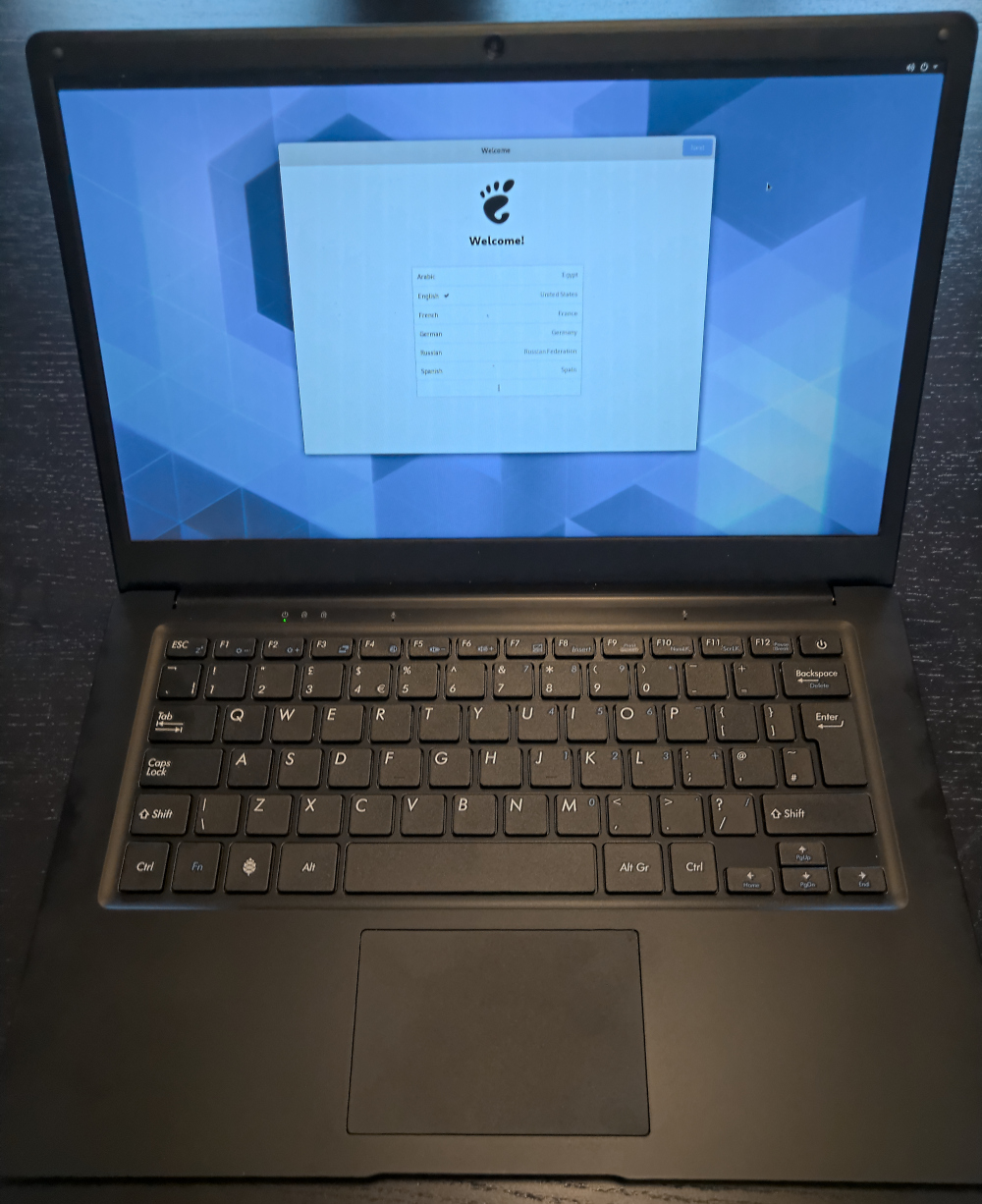
    <content type="html"><![CDATA[<p>Recently, I have been working on running GNOME OS on the Pinebook Pro.</p>
<p>GNOME OS is a bootable image used to test vanilla GNOME without
dependencies on distributions. It is upgradable through OSTree and has
Flatpak to allow installation of applications. GNOME OS is built using
<a href="https://buildstream.build/">BuildStream</a>. Basic dependencies are
provided by <a href="https://gitlab.com/freedesktop-sdk/freedesktop-sdk">Freedesktop
SDK</a>.</p>
<p>The <a href="https://wiki.pine64.org/index.php/Pinebook_Pro">Pinebook Pro</a> is
a $200 arm 64 laptop from PINE64.</p>
<p>The merge request I am working on is available at:
<a href="https://gitlab.gnome.org/GNOME/gnome-build-meta/-/merge_requests/577">https://gitlab.gnome.org/GNOME/gnome-build-meta/-/merge_requests/577</a></p>
<p><img src="/gnome-os-pinebook-pro.jpg" alt="GNOME Initial Setup running Pinebook Pro"></p>
<p>U-Boot and the Linux kernel are not yet mainline. The source of the
linux kernel we use for the moment is the branch for Manjaro&rsquo;s build
maintained by <a href="https://gitlab.manjaro.org/tsys/">tsys</a>. U-Boot is
built from a branch maintained by <a href="https://eno.space/blog/">ENOSPC</a>.</p>
<p>Apart from that we mostly use all the components of a standard GNOME
OS image, including Wayland and EFI boot through systemd-boot.</p>
<h3 id="how-to-test-it">How to test it</h3>
<p>First, note that this is a work in progress, so do not open issues
before the branch is merged. Instead, you may comment on the <a href="https://gitlab.gnome.org/GNOME/gnome-build-meta/-/merge_requests/577">merge
request</a>. But
do not expect everything to work.
(Edit: You can also join <code>#gnome-os</code> on GIMPNet)</p>
<p>To download the image, find the latest <a href="https://gitlab.gnome.org/GNOME/gnome-build-meta/-/merge_requests/577/pipelines">pipeline for the merge
request</a>,
where the last bullet is green. On that bullet, select
<code>pinebook-pro-image</code>. Then download the job artifact.</p>
<p>In that job artifact, there will be a file named <code>disk.qcow2</code>. You can
flash it to an sd card or an eMMC module using <code>qemu-img dd if=disk.qcow2 of=/dev/device-to-which-to-write</code>.</p>
<p>If you do not get anything to boot, I recommend you use the <a href="https://wiki.pine64.org/index.php/Pinebook_Pro#Using_the_UART">serial
port of the
computer</a>
to debug the issue.</p>
<h3 id="updating-the-keyboard-and-touchpad-firmware">Updating the keyboard and touchpad firmware</h3>
<p>Some first batches of the Pinebook Pro require a firmware
update. Unfortunately, there is no automatic way to do it at the
moment.</p>
<p>If your keyboard is an ISO keyboard, do the following.</p>
<div class="highlight"><pre tabindex="0" class="chroma"><code class="language-sh" data-lang="sh"><span class="line"><span class="cl">$ sudo pinebook-pro-keyboard-updater step-1 iso
</span></span></code></pre></div><p>Then reboot. After reboot:</p>
<div class="highlight"><pre tabindex="0" class="chroma"><code class="language-sh" data-lang="sh"><span class="line"><span class="cl">$ sudo pinebook-pro-keyboard-updater step-2 iso
</span></span></code></pre></div><p>Then reboot one more time. The firmware is updated.</p>
<p>If you have an ANSI keyboard, replace <code>iso</code> by <code>ansi</code> in the command
line.</p>
<h3 id="aknowledgements">Aknowledgements</h3>
<p>This work has been sponsored by <a href="https://codethink.co.uk/">Codethink Ltd</a>.</p>
<div style="text-align: center">
  <a href="https://codethink.co.uk/">
     <img
       src="/codethink-logo.png"
       alt="Codethink Logo"
       />
  </a>
</div>

]]></content>
  </entry>
  <entry>
    <title type="html"><![CDATA[Testing Mesa ACO with Flatpak (updated)]]></title>
    <link href="https://valentindavid.com/posts/2019-09-12-testing-mesa-aco-with-flatpak-updated/"/>
    <id>https://valentindavid.com/posts/2019-09-12-testing-mesa-aco-with-flatpak-updated/</id>
    <author>
      <name>Valentin David</name>
    </author>
    <published>2019-09-12T00:00:00+00:00</published>
    <updated>2019-09-12T00:00:00+00:00</updated>
    <content type="html"><![CDATA[
<div class="note-notice"><p>This is an updated version of the original post <a href="https://valentindavid.com/posts/2019-07-04-testing-mesa-aco-with-flatpak/">Testing Mesa ACO with Flatpak</a></p>
</div>

<p>Valve has been <a href="https://steamcommunity.com/games/221410/announcements/detail/1602634609636894200">asking users to help with
testing</a>
the <a href="https://github.com/daniel-schuermann/mesa/commits/master">ACO
patches</a> for
<a href="http://mesa.freedesktop.org/">Mesa</a>. It replaces LLVM to compile
shaders.</p>
<p>Testing a development or patched version of Mesa is not necessarily
easy. So in order to help users in doing testing we are building an
extension for the upcoming Freedesktop SDK 19.08. No need to build
anything. Just install and define <code>FLATPAK_GL_DRIVERS</code> to select the
patched version of Mesa.</p>
<p>And good news, everyone: the <a href="https://github.com/flathub/com.valvesoftware.Steam">Flatpak application for
Steam</a> now uses
Freedesktop SDK 19.08.</p>
<p>However we do not deliver the ACO+Mesa extension to flathub. So you
will need to get it from our development release server.</p>
<p>So here is the procedure. Install the runtime and the mesa
extensions:</p>
<pre tabindex="0"><code>flatpak remote-add --user freedesktop-sdk https://cache.sdk.freedesktop.org/freedesktop-sdk.flatpakrepo
flatpak install --user freedesktop-sdk \
    org.freedesktop.Platform.GL.mesa-aco//19.08 \
    org.freedesktop.Platform.GL32.mesa-aco//19.08
</code></pre><p>Then install Steam&rsquo;s Flatpak app. If you are unsure on how, <a href="https://flathub.org/apps/details/com.valvesoftware.Steam">its
page</a>
contains the instructions.</p>
<p>To run it, make sure Steam is not already running. Then:</p>
<pre tabindex="0"><code>FLATPAK_GL_DRIVERS=mesa-aco flatpak run com.valvesoftware.Steam
</code></pre><p>If you wish to make the launcher always use Mesa ACO drivers, you can
set it like so:</p>
<pre tabindex="0"><code>sudo sed -i &#34;s,Exec=,Exec=env FLATPAK_GL_DRIVERS=mesa-aco ,&#34; /var/lib/flatpak/exports/share/applications/com.valvesoftware.Steam.desktop
</code></pre><p>You should see somewhere in the console the following message:</p>
<pre tabindex="0"><code>WARNING: Experimental compiler backend enabled. Here be dragons! Incorrect rendering, GPU hangs and/or resets are likely
</code></pre><p>If you see it, you are all set. And you can start testing. Remember
you can set <code>RADV_PERFTEST=llvm</code> as environment variable to disable
ACO if you want to compare.</p>
<p>Please follow the <a href="https://steamcommunity.com/app/221410/discussions/0/1640915206474070669/">ACO testing
instructions</a>.</p>
<p>If you are using flatpak to test, please report issues to us before,
either on IRC (<code>#freedesktop-sdk</code> on Freenode) or on <a href="https://gitlab.com/freedesktop-sdk/freedesktop-sdk/issues">our issue
tracker</a>.
We can make sure the issue is not an issue on our side.</p>
]]></content>
  </entry>
  <entry>
    <title type="html"><![CDATA[Testing Mesa ACO with Flatpak]]></title>
    <link href="https://valentindavid.com/posts/2019-07-04-testing-mesa-aco-with-flatpak/"/>
    <id>https://valentindavid.com/posts/2019-07-04-testing-mesa-aco-with-flatpak/</id>
    <author>
      <name>Valentin David</name>
    </author>
    <published>2019-07-04T00:00:00+00:00</published>
    <updated>2019-07-04T00:00:00+00:00</updated>
    <content type="html"><![CDATA[
<div class="note-warning"><p>The Flatpak application for Steam has been updated to use Freedesktop
19.08. The instructions here are deprecated. Please read the updated
instructions in
<a href="https://valentindavid.com/posts/2019-09-12-testing-mesa-aco-with-flatpak-updated/">the corrected post</a>.</p>
</div>

<p>Valve has been <a href="https://steamcommunity.com/games/221410/announcements/detail/1602634609636894200">asking users to help with
testing</a>
the <a href="https://github.com/daniel-schuermann/mesa/commits/master">ACO
patches</a> for
<a href="http://mesa.freedesktop.org/">Mesa</a>. It replaces LLVM to compile
shaders.</p>
<p>Testing a development or patched version of Mesa is not necessarily
easy. So in order to help users in doing testing we are building an
extension for the upcoming Freedesktop SDK 19.08. No need to build
anything. Just install and define <code>FLATPAK_GL_DRIVERS</code> to select the
patched version of Mesa.</p>
<p>And good news: the <a href="https://github.com/flathub/com.valvesoftware.Steam">Flatpak application for
Steam</a> has now a
beta release working with 19.08beta of Freedesktop SDK.</p>
<p>However we do not deliver the ACO+Mesa extension to flathub. So you
will need to get it from our development release server.</p>
<p>So here is the procedure. First install the runtime and the mesa
extensions:</p>
<pre tabindex="0"><code>flatpak remote-add --user freedesktop-sdk https://cache.sdk.freedesktop.org/freedesktop-sdk.flatpakrepo
flatpak install --user freedesktop-sdk \
    org.freedesktop.Platform//19.08beta \
    org.freedesktop.Platform.GL.mesa-aco//19.08beta \
    org.freedesktop.Platform.GL32.mesa-aco//19.08beta \
    org.freedesktop.Platform.GL32.default//19.08beta \
    org.freedesktop.Platform.Compat.i386//19.08beta
</code></pre><p>Then install Steam&rsquo;s beta Flatpak app (it is not the beta of Steam,
just the Flatpak app).</p>
<pre tabindex="0"><code>flatpak remote-add --user flathub-beta https://dl.flathub.org/beta-repo/flathub-beta.flatpakrepo
flatpak install --user flathub-beta com.valvesoftware.Steam//beta
</code></pre><p>To run it, make sure Steam is not already running. Then:</p>
<pre tabindex="0"><code>FLATPAK_GL_DRIVERS=mesa-aco flatpak run com.valvesoftware.Steam//beta
</code></pre><p>You should see somewhere in the console the following message:</p>
<pre tabindex="0"><code>WARNING: Experimental compiler backend enabled. Here be dragons! Incorrect rendering, GPU hangs and/or resets are likely
</code></pre><p>If you see it, you are all set. And you can start testing. Remember
you can set <code>RADV_PERFTEST=llvm</code> as environment variable to disable
ACO if you want to compare.</p>
<p>Please follow the <a href="https://steamcommunity.com/app/221410/discussions/0/1640915206474070669/">ACO testing
instructions</a>.</p>
<p>If you are using flatpak to test, please report issues to us before,
either on IRC (<code>#freedesktop-sdk</code> on Freenode) or on <a href="https://gitlab.com/freedesktop-sdk/freedesktop-sdk/issues">our issue
tracker</a>.
We can make sure the issue is not an issue on our side.</p>
]]></content>
  </entry>
  <entry>
    <title type="html"><![CDATA[Freedesktop SDK cross compilers]]></title>
    <link href="https://valentindavid.com/posts/2019-06-25-freedesktop-sdk-cross-compiler/"/>
    <id>https://valentindavid.com/posts/2019-06-25-freedesktop-sdk-cross-compiler/</id>
    <author>
      <name>Valentin David</name>
    </author>
    <published>2019-06-25T00:00:00+00:00</published>
    <updated>2019-06-25T00:00:00+00:00</updated>
    <content type="html"><![CDATA[<p>In upcoming Freedesktop SDK 19.08 release, we will introduce cross
compilers. x86-64 will be able to cross-compile to all other available
architectures. aarch64 will be able to cross-compiler to armv7.</p>
<h3 id="motivation">Motivation</h3>
<h4 id="legacy-32-bit-support">Legacy 32-bit support</h4>
<p>Freedesktop SDK does not provide support for multilib.  Multilib is
having <code>/usr/lib</code> and <code>/usr/lib64</code> as library directories and support
for <code>-m32</code> in GCC.</p>
<p>In order to support applications providing both 64-bit and 32-bit
binaries, the 32-bit library directory was mounted in a different
directory. The original path of 32-bit libraries would conflict with
the path of the 64-bit ones. So the 32-bit library were in a
directory that they were not intended to be. This directory was added
in <code>LD_LIBRARY_PATH</code> originally, and later in <code>ld.so.cache</code>.</p>
<p>However, due to recurrent issues with some 32-bit games in Steam,
multiarch library paths were introduced in the 18.08 release. The
library directories are like like <code>/usr/lib/x86_64-linux-gnu</code>.
<a href="https://wiki.debian.org/Multiarch">Multiarch</a> comes from Debian.  It
is a solution that is more generic than multilib, more future-proof,
and cross-compilation and emulation friendly.</p>
<p>32-bit runtime is extracted from the 32-bit build, and then added to
at the right library path as an extension to the 64-bit runtime.</p>
<p>Unfortunately, applications needing to build extra 32-bit libraries
that were not in the Freedesktop SDK would have needed some
complicated hacks when using Flatpak Builder. This is because <code>-m32</code>
is not supported. The 32-bit libraries need to be built with the
32-bit SDK and then extracted and reimported.</p>
<p>Providing a cross-compiler as well as a multiarch SDK would solve this
issue.</p>
<p>Steam was the only application needing 32-bit support. At first, no
extra 32-bit runtime that was not in Freedesktop SDK was
required. This has changer. Also now <a href="http://lutris.net/">Lutris</a>,
which is available as beta <a href="https://github.com/flathub/net.lutris.Lutris">Flatpak
application</a> on Flathub
requires 32-bit Wine and is waiting for 32-bit cross-compilers.</p>
<h4 id="building-applications-for-smaller-devices">Building applications for smaller devices</h4>
<p>Phones, tablets and netbooks often use ARM. But developers typically
develop on x86-64. Most developers do not own an ARM board to build
their applications.</p>
<p>For now, those who wanted to test building Flatpak applications for
ARM needed to use QEMU. The issue is that running the compiler on
emulation is potentially slow. And it is not unlikely that
applications need to build some big libraries like WebKit. This would
take an awful long time.</p>
<h3 id="cross-compile-with-flatpakbuilder">Cross-compile with FlatpakBuilder</h3>
<p>Let&rsquo;s say we want to cross-compile GNU Hello, from an x86_64 machine
to aarch64.</p>
<p>First we need to install the 19.08 SDK. This will come soon as beta
on flathub. But for the moment, we can add remote
<code>https://cache.sdk.freedesktop.org/freedesktop-sdk.flatpakrepo</code></p>
<p>We will need to install:</p>
<ul>
<li>
<p><code>org.freedesktop.Sdk//19.08</code>, the build SDK.</p>
</li>
<li>
<p><code>org.freedesktop.Sdk.Extension.toolchain-aarch64//19.08</code>, the cross
compiler extension. It contains mostly the linker and the compiler.</p>
</li>
<li>
<p><code>org.freedesktop.Sdk.Compat.aarch64//19.08</code>, the SDK for the target
runtime. This contains the libraries to link to, the pkg-config
files, and the architecture dependent headers.</p>
</li>
<li>
<p><code>org.freedesktop.Platform/aarch64/19.08</code>, the target runtime.  This
is not used to build, but it is required to be installed by Flatpak
Builder.</p>
</li>
</ul>
<p>We will then create file <code>org.gnu.Hello.yml</code>:</p>
<div class="highlight"><pre tabindex="0" class="chroma"><code class="language-yaml" data-lang="yaml"><span class="line"><span class="cl"><span class="nt">app-id</span><span class="p">:</span><span class="w"> </span><span class="l">org.gnu.Hello</span><span class="w">
</span></span></span><span class="line"><span class="cl"><span class="w"></span><span class="c"># We need to force here the target architecture for the runtime</span><span class="w">
</span></span></span><span class="line"><span class="cl"><span class="w"></span><span class="nt">runtime</span><span class="p">:</span><span class="w"> </span><span class="l">org.freedesktop.Platform/aarch64</span><span class="w">
</span></span></span><span class="line"><span class="cl"><span class="w"></span><span class="nt">runtime-version</span><span class="p">:</span><span class="w"> </span><span class="s1">&#39;19.08&#39;</span><span class="w">
</span></span></span><span class="line"><span class="cl"><span class="w"></span><span class="c"># To avoid confusion we can set the architecture for the SDK. But this is</span><span class="w">
</span></span></span><span class="line"><span class="cl"><span class="w"></span><span class="c"># not important.</span><span class="w">
</span></span></span><span class="line"><span class="cl"><span class="w"></span><span class="nt">sdk</span><span class="p">:</span><span class="w"> </span><span class="l">org.freedesktop.Sdk/x86_64</span><span class="w">
</span></span></span><span class="line"><span class="cl"><span class="w"></span><span class="nt">command</span><span class="p">:</span><span class="w"> </span><span class="l">hello</span><span class="w">
</span></span></span><span class="line"><span class="cl"><span class="w"></span><span class="nt">sdk-extensions</span><span class="p">:</span><span class="w">
</span></span></span><span class="line"><span class="cl"><span class="w"></span><span class="c"># We need to ensure the toolchain is available</span><span class="w">
</span></span></span><span class="line"><span class="cl"><span class="w"></span>- <span class="l">org.freedesktop.Sdk.Extension.toolchain-aarch64</span><span class="w">
</span></span></span><span class="line"><span class="cl"><span class="w"></span><span class="c"># As well as the target SDK</span><span class="w">
</span></span></span><span class="line"><span class="cl"><span class="w"></span>- <span class="l">org.freedesktop.Sdk.Compat.aarch64</span><span class="w">
</span></span></span><span class="line"><span class="cl"><span class="w">
</span></span></span><span class="line"><span class="cl"><span class="w"></span><span class="nt">modules</span><span class="p">:</span><span class="w">
</span></span></span><span class="line"><span class="cl"><span class="w">  </span>- <span class="nt">name</span><span class="p">:</span><span class="w"> </span><span class="l">hello</span><span class="w">
</span></span></span><span class="line"><span class="cl"><span class="w">    </span><span class="nt">buildsystem</span><span class="p">:</span><span class="w"> </span><span class="l">autotools</span><span class="w">
</span></span></span><span class="line"><span class="cl"><span class="w">    </span><span class="nt">build-options</span><span class="p">:</span><span class="w">
</span></span></span><span class="line"><span class="cl"><span class="w">      </span><span class="c"># Add the cross compiler to the PATH</span><span class="w">
</span></span></span><span class="line"><span class="cl"><span class="w">      </span><span class="nt">append-path</span><span class="p">:</span><span class="w"> </span><span class="l">/usr/lib/sdk/toolchain-aarch64/bin</span><span class="w">
</span></span></span><span class="line"><span class="cl"><span class="w">      </span><span class="c"># binutils are available there in a different path. GCC knows</span><span class="w">
</span></span></span><span class="line"><span class="cl"><span class="w">      </span><span class="c"># where to get them. But if we need access to those tools,</span><span class="w">
</span></span></span><span class="line"><span class="cl"><span class="w">      </span><span class="c"># they can be added to the path that way:</span><span class="w">
</span></span></span><span class="line"><span class="cl"><span class="w">      </span><span class="c"># prepend-path: /usr/lib/sdk/toolchain-aarch64/aarch64-unknown-linux-gnu/bin</span><span class="w">
</span></span></span><span class="line"><span class="cl"><span class="w">
</span></span></span><span class="line"><span class="cl"><span class="w">      </span><span class="c"># In this case we do not need pkg-config. But if needed,</span><span class="w">
</span></span></span><span class="line"><span class="cl"><span class="w">      </span><span class="c"># we can add this path:</span><span class="w">
</span></span></span><span class="line"><span class="cl"><span class="w">      </span><span class="c"># prepend-pkg-config-path: /usr/lib/aarch64-linux-gnu/pkgconfig</span><span class="w">
</span></span></span><span class="line"><span class="cl"><span class="w">      </span><span class="nt">env</span><span class="p">:</span><span class="w">
</span></span></span><span class="line"><span class="cl"><span class="w">        </span><span class="c"># Because default CFLAGS are architecture-specific, we need</span><span class="w">
</span></span></span><span class="line"><span class="cl"><span class="w">	</span><span class="c"># to reset them to something more portable.</span><span class="w">
</span></span></span><span class="line"><span class="cl"><span class="w">        </span><span class="nt">CFLAGS</span><span class="p">:</span><span class="w"> </span>-<span class="l">g -O2</span><span class="w">
</span></span></span><span class="line"><span class="cl"><span class="w">        </span><span class="nt">CXXFLAGS</span><span class="p">:</span><span class="w"> </span>-<span class="l">g -O2</span><span class="w">
</span></span></span><span class="line"><span class="cl"><span class="w">      </span><span class="nt">config-opts</span><span class="p">:</span><span class="w">
</span></span></span><span class="line"><span class="cl"><span class="w">      </span><span class="c"># This is a standard option for autoconf to cross-comile</span><span class="w">
</span></span></span><span class="line"><span class="cl"><span class="w">      </span>- --<span class="l">host=aarch64-unknown-linux-gnu</span><span class="w">
</span></span></span><span class="line"><span class="cl"><span class="w">    </span><span class="nt">sources</span><span class="p">:</span><span class="w">
</span></span></span><span class="line"><span class="cl"><span class="w">      </span>- <span class="nt">type</span><span class="p">:</span><span class="w"> </span><span class="l">archive</span><span class="w">
</span></span></span><span class="line"><span class="cl"><span class="w">        </span><span class="nt">url</span><span class="p">:</span><span class="w"> </span><span class="l">https://ftp.gnu.org/gnu/hello/hello-2.10.tar.gz</span><span class="w">
</span></span></span><span class="line"><span class="cl"><span class="w">        </span><span class="nt">sha256</span><span class="p">:</span><span class="w"> </span><span class="l">31e066137a962676e89f69d1b65382de95a7ef7d914b8cb956f41ea72e0f516b</span><span class="w">
</span></span></span></code></pre></div><p>With this we can now build our application.</p>
<div class="highlight"><pre tabindex="0" class="chroma"><code class="language-sh" data-lang="sh"><span class="line"><span class="cl"><span class="c1"># We build and commit the app in repo/</span>
</span></span><span class="line"><span class="cl">flatpak-builder build org.gnu.Hello.yml --repo<span class="o">=</span>repo
</span></span><span class="line"><span class="cl">
</span></span><span class="line"><span class="cl"><span class="c1"># We create a new repository containing the commits for aarch64</span>
</span></span><span class="line"><span class="cl">ostree init --mode archive-z2 --repo<span class="o">=</span>aarch64-repo
</span></span><span class="line"><span class="cl">
</span></span><span class="line"><span class="cl"><span class="k">for</span> i in app/org.gnu.Hello <span class="se">\
</span></span></span><span class="line"><span class="cl"><span class="se"></span>         runtime/org.gnu.Hello.Debug <span class="se">\
</span></span></span><span class="line"><span class="cl"><span class="se"></span>	 runtime/org.gnu.Hello.Locale
</span></span><span class="line"><span class="cl"><span class="k">do</span>
</span></span><span class="line"><span class="cl">     <span class="c1"># We rename the commits to for them to be for aarch64</span>
</span></span><span class="line"><span class="cl">     flatpak build-commit-from <span class="se">\
</span></span></span><span class="line"><span class="cl"><span class="se"></span>        --src-ref<span class="o">=</span><span class="si">${</span><span class="nv">i</span><span class="si">}</span>/x86_64/master <span class="se">\
</span></span></span><span class="line"><span class="cl"><span class="se"></span>	--src-repo<span class="o">=</span>repo <span class="se">\
</span></span></span><span class="line"><span class="cl"><span class="se"></span>	aarch64-repo <span class="se">\
</span></span></span><span class="line"><span class="cl"><span class="se"></span>	<span class="si">${</span><span class="nv">i</span><span class="si">}</span>/aarch64/master
</span></span><span class="line"><span class="cl"><span class="k">done</span>
</span></span><span class="line"><span class="cl">
</span></span><span class="line"><span class="cl"><span class="c1"># Now we can create a bundle for our application</span>
</span></span><span class="line"><span class="cl">flatpak build-bundle --arch<span class="o">=</span>aarch64 <span class="se">\
</span></span></span><span class="line"><span class="cl"><span class="se"></span>                     aarch64-repo <span class="se">\
</span></span></span><span class="line"><span class="cl"><span class="se"></span>		     org.gnu.Hello-aarch64.bundle <span class="se">\
</span></span></span><span class="line"><span class="cl"><span class="se"></span>		     org.gnu.Hello
</span></span></code></pre></div><p>We will then get a bundle called <code>org.gnu.Hello-aarch64.bundle</code>. We
can transfer it to a device to be installed and tested.</p>
<h3 id="cross-compile-with-buildstream">Cross-compile with BuildStream</h3>
<p>Let&rsquo;s do the same exercise but using BuildStream instead.</p>
<p>To cross-compile in BuildStream, <code>cross-compilers/gcc-&lt;arch&gt;.bst</code>
needs to be used. The runtime also needs to be imported.  For the
moment only the standard runtime is provided (glibc, GCC&rsquo;s libstdc++
and GCC&rsquo;s runtime). This is because BuildStream does not allow yet to
import artifacts built from different architectures. For our example,
GNU Hello, we do not need anything else than glibc and GCC&rsquo;s runtime.
This runtime is available from
<code>cross-compilers/standard-libs-&lt;arch&gt;.bst</code></p>
<p>Here is the <code>project.conf</code>.</p>
<div class="highlight"><pre tabindex="0" class="chroma"><code class="language-yaml" data-lang="yaml"><span class="line"><span class="cl"><span class="nt">name</span><span class="p">:</span><span class="w"> </span><span class="l">hello</span><span class="w">
</span></span></span><span class="line"><span class="cl"><span class="w"></span><span class="nt">ref-storage</span><span class="p">:</span><span class="w"> </span><span class="l">project.refs</span><span class="w">
</span></span></span><span class="line"><span class="cl"><span class="w">
</span></span></span><span class="line"><span class="cl"><span class="w"></span><span class="nt">variables</span><span class="p">:</span><span class="w">
</span></span></span><span class="line"><span class="cl"><span class="w">  </span><span class="c"># Application files should be installed in /app for flatpak applications</span><span class="w">
</span></span></span><span class="line"><span class="cl"><span class="w">  </span><span class="nt">prefix</span><span class="p">:</span><span class="w"> </span><span class="l">/app</span><span class="w">
</span></span></span><span class="line"><span class="cl"><span class="w">
</span></span></span><span class="line"><span class="cl"><span class="w">  </span><span class="c"># Debugdir is still unchange, we will extract files at the right place</span><span class="w">
</span></span></span><span class="line"><span class="cl"><span class="w">  </span><span class="nt">debugdir</span><span class="p">:</span><span class="w"> </span><span class="l">/usr/lib/debug</span><span class="w">
</span></span></span><span class="line"><span class="cl"><span class="w">
</span></span></span><span class="line"><span class="cl"><span class="w"></span><span class="c"># We enable flatpak related plugins</span><span class="w">
</span></span></span><span class="line"><span class="cl"><span class="w"></span><span class="nt">plugins</span><span class="p">:</span><span class="w">
</span></span></span><span class="line"><span class="cl"><span class="w"></span>- <span class="nt">origin</span><span class="p">:</span><span class="w"> </span><span class="l">pip</span><span class="w">
</span></span></span><span class="line"><span class="cl"><span class="w">  </span><span class="nt">package-name</span><span class="p">:</span><span class="w"> </span><span class="l">buildstream-external</span><span class="w">
</span></span></span><span class="line"><span class="cl"><span class="w">  </span><span class="nt">elements</span><span class="p">:</span><span class="w">
</span></span></span><span class="line"><span class="cl"><span class="w">    </span><span class="nt">flatpak_image</span><span class="p">:</span><span class="w"> </span><span class="m">0</span><span class="w">
</span></span></span><span class="line"><span class="cl"><span class="w">    </span><span class="nt">flatpak_repo</span><span class="p">:</span><span class="w"> </span><span class="m">0</span><span class="w">
</span></span></span><span class="line"><span class="cl"><span class="w">
</span></span></span><span class="line"><span class="cl"><span class="w"></span><span class="nt">environment</span><span class="p">:</span><span class="w">
</span></span></span><span class="line"><span class="cl"><span class="w">  </span><span class="c"># We add the aarch64 toolchain in the path</span><span class="w">
</span></span></span><span class="line"><span class="cl"><span class="w">  </span><span class="c"># If some tools use binutils without querying `gcc -print-prog-name`,</span><span class="w">
</span></span></span><span class="line"><span class="cl"><span class="w">  </span><span class="c"># we can add `/usr/lib/sdk/toolchain-aarch64/aarch64-unknown-linux-gnu/bin`.</span><span class="w">
</span></span></span><span class="line"><span class="cl"><span class="w">  </span><span class="nt">PATH</span><span class="p">:</span><span class="w"> </span><span class="s1">&#39;/usr/lib/sdk/toolchain-aarch64/bin:/usr/bin&#39;</span><span class="w">
</span></span></span><span class="line"><span class="cl"><span class="w">
</span></span></span><span class="line"><span class="cl"><span class="w">  </span><span class="c"># In theory we should add pkg-config path. In practice,</span><span class="w">
</span></span></span><span class="line"><span class="cl"><span class="w">  </span><span class="c"># we do not yet have the runtime available on BuildStream.</span><span class="w">
</span></span></span><span class="line"><span class="cl"><span class="w">  </span><span class="nt">PKG_CONFIG_PATH</span><span class="p">:</span><span class="w"> </span><span class="s1">&#39;/usr/lib/aarch64-linux-gnu/pkgconfig:&#39;</span><span class="w">
</span></span></span><span class="line"><span class="cl"><span class="w">
</span></span></span><span class="line"><span class="cl"><span class="w"></span><span class="nt">elements</span><span class="p">:</span><span class="w">
</span></span></span><span class="line"><span class="cl"><span class="w">  </span><span class="c"># Autotools supports cross-compilation out of the box. We enable it</span><span class="w">
</span></span></span><span class="line"><span class="cl"><span class="w">  </span><span class="c"># by default for all our elements.</span><span class="w">
</span></span></span><span class="line"><span class="cl"><span class="w">  </span><span class="nt">autotools</span><span class="p">:</span><span class="w">
</span></span></span><span class="line"><span class="cl"><span class="w">    </span><span class="nt">conf-global</span><span class="p">:</span><span class="w"> </span><span class="p">&gt;-</span><span class="sd">
</span></span></span><span class="line"><span class="cl"><span class="sd">      --build=x86_64-unknown-linux-gnu
</span></span></span><span class="line"><span class="cl"><span class="sd">      --host=aarch64-unknown-linux-gnu</span><span class="w">      
</span></span></span></code></pre></div><p>The Freedesktop SDK junction <code>freedesktop-sdk.bst</code>:</p>
<div class="highlight"><pre tabindex="0" class="chroma"><code class="language-yaml" data-lang="yaml"><span class="line"><span class="cl"><span class="nt">kind</span><span class="p">:</span><span class="w"> </span><span class="l">junction</span><span class="w">
</span></span></span><span class="line"><span class="cl"><span class="w">
</span></span></span><span class="line"><span class="cl"><span class="w"></span><span class="nt">config</span><span class="p">:</span><span class="w">
</span></span></span><span class="line"><span class="cl"><span class="w">  </span><span class="nt">options</span><span class="p">:</span><span class="w">
</span></span></span><span class="line"><span class="cl"><span class="w">    </span><span class="nt">bootstrap_build_arch</span><span class="p">:</span><span class="w"> </span><span class="s2">&#34;x86_64&#34;</span><span class="w">
</span></span></span><span class="line"><span class="cl"><span class="w">    </span><span class="nt">target_arch</span><span class="p">:</span><span class="w"> </span><span class="s2">&#34;x86_64&#34;</span><span class="w">
</span></span></span><span class="line"><span class="cl"><span class="w">
</span></span></span><span class="line"><span class="cl"><span class="w"></span><span class="nt">sources</span><span class="p">:</span><span class="w">
</span></span></span><span class="line"><span class="cl"><span class="w"></span>- <span class="nt">kind</span><span class="p">:</span><span class="w"> </span><span class="l">git</span><span class="w">
</span></span></span><span class="line"><span class="cl"><span class="w">  </span><span class="nt">url</span><span class="p">:</span><span class="w"> </span><span class="l">https://gitlab.com/freedesktop-sdk/freedesktop-sdk.git</span><span class="w">
</span></span></span><span class="line"><span class="cl"><span class="w">  </span><span class="nt">track</span><span class="p">:</span><span class="w"> </span><span class="l">master</span><span class="w">
</span></span></span></code></pre></div><p>And here is the element <code>hello.bst</code>.</p>
<div class="highlight"><pre tabindex="0" class="chroma"><code class="language-yaml" data-lang="yaml"><span class="line"><span class="cl"><span class="nt">kind</span><span class="p">:</span><span class="w"> </span><span class="l">autotools</span><span class="w">
</span></span></span><span class="line"><span class="cl"><span class="w">
</span></span></span><span class="line"><span class="cl"><span class="w"></span><span class="nt">depends</span><span class="p">:</span><span class="w">
</span></span></span><span class="line"><span class="cl"><span class="w"></span>- <span class="nt">filename</span><span class="p">:</span><span class="w"> </span><span class="l">public-stacks/buildsystem-autotools.bst</span><span class="w">
</span></span></span><span class="line"><span class="cl"><span class="w">  </span><span class="nt">junction</span><span class="p">:</span><span class="w"> </span><span class="l">freedesktop-sdk.bst</span><span class="w">
</span></span></span><span class="line"><span class="cl"><span class="w">  </span><span class="nt">type</span><span class="p">:</span><span class="w"> </span><span class="l">build</span><span class="w">
</span></span></span><span class="line"><span class="cl"><span class="w">
</span></span></span><span class="line"><span class="cl"><span class="w">  </span><span class="c"># This is the cross-compiler</span><span class="w">
</span></span></span><span class="line"><span class="cl"><span class="w"></span>- <span class="nt">filename</span><span class="p">:</span><span class="w"> </span><span class="l">cross-compilers/gcc-aarch64.bst</span><span class="w">
</span></span></span><span class="line"><span class="cl"><span class="w">  </span><span class="nt">junction</span><span class="p">:</span><span class="w"> </span><span class="l">freedesktop-sdk.bst</span><span class="w">
</span></span></span><span class="line"><span class="cl"><span class="w">  </span><span class="nt">type</span><span class="p">:</span><span class="w"> </span><span class="l">build</span><span class="w">
</span></span></span><span class="line"><span class="cl"><span class="w">
</span></span></span><span class="line"><span class="cl"><span class="w">  </span><span class="c"># This is the aarch64 runtime to which we need to link</span><span class="w">
</span></span></span><span class="line"><span class="cl"><span class="w"></span>- <span class="nt">filename</span><span class="p">:</span><span class="w"> </span><span class="l">cross-compilers/standard-libs-aarch64.bst</span><span class="w">
</span></span></span><span class="line"><span class="cl"><span class="w">  </span><span class="nt">junction</span><span class="p">:</span><span class="w"> </span><span class="l">freedesktop-sdk.bst</span><span class="w">
</span></span></span><span class="line"><span class="cl"><span class="w">  </span><span class="nt">type</span><span class="p">:</span><span class="w"> </span><span class="l">build</span><span class="w">
</span></span></span><span class="line"><span class="cl"><span class="w">
</span></span></span><span class="line"><span class="cl"><span class="w"></span><span class="nt">sources</span><span class="p">:</span><span class="w">
</span></span></span><span class="line"><span class="cl"><span class="w"></span>- <span class="nt">kind</span><span class="p">:</span><span class="w"> </span><span class="l">tar</span><span class="w">
</span></span></span><span class="line"><span class="cl"><span class="w">  </span><span class="nt">url</span><span class="p">:</span><span class="w"> </span><span class="l">https://ftp.gnu.org/gnu/hello/hello-2.10.tar.gz</span><span class="w">
</span></span></span></code></pre></div><p>The main flatpak element <code>org.gnu.Hello.bst</code>:</p>
<div class="highlight"><pre tabindex="0" class="chroma"><code class="language-yaml" data-lang="yaml"><span class="line"><span class="cl"><span class="nt">kind</span><span class="p">:</span><span class="w"> </span><span class="l">flatpak_image</span><span class="w">
</span></span></span><span class="line"><span class="cl"><span class="w">
</span></span></span><span class="line"><span class="cl"><span class="w"></span><span class="nt">depends</span><span class="p">:</span><span class="w">
</span></span></span><span class="line"><span class="cl"><span class="w"></span>- <span class="nt">filename</span><span class="p">:</span><span class="w"> </span><span class="l">hello.bst</span><span class="w">
</span></span></span><span class="line"><span class="cl"><span class="w">  </span><span class="nt">type</span><span class="p">:</span><span class="w"> </span><span class="l">build</span><span class="w">
</span></span></span><span class="line"><span class="cl"><span class="w">
</span></span></span><span class="line"><span class="cl"><span class="w"></span><span class="nt">config</span><span class="p">:</span><span class="w">
</span></span></span><span class="line"><span class="cl"><span class="w">  </span><span class="nt">directory</span><span class="p">:</span><span class="w"> </span><span class="s1">&#39;%{prefix}&#39;</span><span class="w">
</span></span></span><span class="line"><span class="cl"><span class="w">  </span><span class="nt">exclude</span><span class="p">:</span><span class="w">
</span></span></span><span class="line"><span class="cl"><span class="w">  </span>- <span class="l">debug</span><span class="w">
</span></span></span><span class="line"><span class="cl"><span class="w">
</span></span></span><span class="line"><span class="cl"><span class="w">  </span><span class="nt">metadata</span><span class="p">:</span><span class="w">
</span></span></span><span class="line"><span class="cl"><span class="w">    </span><span class="nt">Application</span><span class="p">:</span><span class="w">
</span></span></span><span class="line"><span class="cl"><span class="w">      </span><span class="nt">name</span><span class="p">:</span><span class="w"> </span><span class="l">org.gnu.Hello</span><span class="w">
</span></span></span><span class="line"><span class="cl"><span class="w">      </span><span class="nt">runtime</span><span class="p">:</span><span class="w"> </span><span class="l">org.freedesktop.Platform/aarch64/19.08</span><span class="w">
</span></span></span><span class="line"><span class="cl"><span class="w">      </span><span class="nt">sdk</span><span class="p">:</span><span class="w"> </span><span class="l">org.freedesktop.Sdk/aarch64/19.08</span><span class="w">
</span></span></span><span class="line"><span class="cl"><span class="w">      </span><span class="nt">command</span><span class="p">:</span><span class="w"> </span><span class="l">hello</span><span class="w">
</span></span></span><span class="line"><span class="cl"><span class="w">
</span></span></span><span class="line"><span class="cl"><span class="w">    </span><span class="nt">&#39;Extension org.gnu.Hello.Debug&#39;</span><span class="p">:</span><span class="w">
</span></span></span><span class="line"><span class="cl"><span class="w">      </span><span class="nt">directory</span><span class="p">:</span><span class="w"> </span><span class="l">lib/debug</span><span class="w">
</span></span></span><span class="line"><span class="cl"><span class="w">      </span><span class="nt">autodelete</span><span class="p">:</span><span class="w"> </span><span class="kc">true</span><span class="w">
</span></span></span><span class="line"><span class="cl"><span class="w">      </span><span class="nt">no-autodownload</span><span class="p">:</span><span class="w"> </span><span class="kc">true</span><span class="w">
</span></span></span></code></pre></div><p>The debug extension element <code>org.gnu.Hello.Debug.bst</code>:</p>
<div class="highlight"><pre tabindex="0" class="chroma"><code class="language-yaml" data-lang="yaml"><span class="line"><span class="cl"><span class="nt">kind</span><span class="p">:</span><span class="w"> </span><span class="l">flatpak_image</span><span class="w">
</span></span></span><span class="line"><span class="cl"><span class="w">
</span></span></span><span class="line"><span class="cl"><span class="w"></span><span class="nt">depends</span><span class="p">:</span><span class="w">
</span></span></span><span class="line"><span class="cl"><span class="w"></span>- <span class="nt">filename</span><span class="p">:</span><span class="w"> </span><span class="l">hello.bst</span><span class="w">
</span></span></span><span class="line"><span class="cl"><span class="w">  </span><span class="nt">type</span><span class="p">:</span><span class="w"> </span><span class="l">build</span><span class="w">
</span></span></span><span class="line"><span class="cl"><span class="w">
</span></span></span><span class="line"><span class="cl"><span class="w"></span><span class="nt">config</span><span class="p">:</span><span class="w">
</span></span></span><span class="line"><span class="cl"><span class="w">  </span><span class="nt">directory</span><span class="p">:</span><span class="w"> </span><span class="s1">&#39;%{debugdir}%{prefix}&#39;</span><span class="w">
</span></span></span><span class="line"><span class="cl"><span class="w">
</span></span></span><span class="line"><span class="cl"><span class="w">  </span><span class="nt">metadata</span><span class="p">:</span><span class="w">
</span></span></span><span class="line"><span class="cl"><span class="w">    </span><span class="nt">Runtime</span><span class="p">:</span><span class="w">
</span></span></span><span class="line"><span class="cl"><span class="w">      </span><span class="nt">name</span><span class="p">:</span><span class="w"> </span><span class="l">org.gnu.Hello.Debug</span><span class="w">
</span></span></span><span class="line"><span class="cl"><span class="w">
</span></span></span><span class="line"><span class="cl"><span class="w">    </span><span class="nt">ExtensionOf</span><span class="p">:</span><span class="w">
</span></span></span><span class="line"><span class="cl"><span class="w">      </span><span class="nt">ref</span><span class="p">:</span><span class="w"> </span><span class="s1">&#39;app/org.gnu.Hello/x86_64/master&#39;</span><span class="w">
</span></span></span></code></pre></div><p>And finally the flatpak repository <code>flatpak-release-deps.bst</code>:</p>
<div class="highlight"><pre tabindex="0" class="chroma"><code class="language-yaml" data-lang="yaml"><span class="line"><span class="cl"><span class="nt">kind</span><span class="p">:</span><span class="w"> </span><span class="l">flatpak_repo</span><span class="w">
</span></span></span><span class="line"><span class="cl"><span class="w">
</span></span></span><span class="line"><span class="cl"><span class="w"></span><span class="nt">depends</span><span class="p">:</span><span class="w">
</span></span></span><span class="line"><span class="cl"><span class="w"></span>- <span class="nt">filename</span><span class="p">:</span><span class="w"> </span><span class="l">org.gnu.Hello.bst</span><span class="w">
</span></span></span><span class="line"><span class="cl"><span class="w">  </span><span class="nt">type</span><span class="p">:</span><span class="w"> </span><span class="l">build</span><span class="w">
</span></span></span><span class="line"><span class="cl"><span class="w"></span>- <span class="nt">filename</span><span class="p">:</span><span class="w"> </span><span class="l">org.gnu.Hello.Debug.bst</span><span class="w">
</span></span></span><span class="line"><span class="cl"><span class="w">  </span><span class="nt">type</span><span class="p">:</span><span class="w"> </span><span class="l">build</span><span class="w">
</span></span></span><span class="line"><span class="cl"><span class="w"></span>- <span class="nt">filename</span><span class="p">:</span><span class="w"> </span><span class="l">deploy-tools/flatpak.bst</span><span class="w">
</span></span></span><span class="line"><span class="cl"><span class="w">  </span><span class="nt">junction</span><span class="p">:</span><span class="w"> </span><span class="l">freedesktop-sdk.bst</span><span class="w">
</span></span></span><span class="line"><span class="cl"><span class="w">  </span><span class="nt">type</span><span class="p">:</span><span class="w"> </span><span class="l">build</span><span class="w">
</span></span></span><span class="line"><span class="cl"><span class="w">
</span></span></span><span class="line"><span class="cl"><span class="w"></span><span class="nt">config</span><span class="p">:</span><span class="w">
</span></span></span><span class="line"><span class="cl"><span class="w">  </span><span class="nt">arch</span><span class="p">:</span><span class="w"> </span><span class="l">aarch64</span><span class="w">
</span></span></span><span class="line"><span class="cl"><span class="w">  </span><span class="nt">branch</span><span class="p">:</span><span class="w"> </span><span class="l">master</span><span class="w">
</span></span></span><span class="line"><span class="cl"><span class="w">
</span></span></span><span class="line"><span class="cl"><span class="w">  </span><span class="nt">environment</span><span class="p">:</span><span class="w">
</span></span></span><span class="line"><span class="cl"><span class="w">  </span>- <span class="l">deploy-tools/flatpak.bst</span><span class="w">
</span></span></span></code></pre></div><p>In order to build and bundle our application we now
need to run the following commands.</p>
<div class="highlight"><pre tabindex="0" class="chroma"><code class="language-sh" data-lang="sh"><span class="line"><span class="cl"><span class="c1"># First we need to track separately junctions.</span>
</span></span><span class="line"><span class="cl">bst track freedesktop-sdk.bst
</span></span><span class="line"><span class="cl"><span class="c1"># Then we track our elements.</span>
</span></span><span class="line"><span class="cl">bst build --track hello.bst
</span></span><span class="line"><span class="cl"><span class="c1"># We build the flatpak repository and extract it</span>
</span></span><span class="line"><span class="cl">bst build flatpak-repo.bst
</span></span><span class="line"><span class="cl">bst checkout flatpak-repo.bst repo
</span></span><span class="line"><span class="cl">
</span></span><span class="line"><span class="cl"><span class="c1"># We then convert the repository to a bundle</span>
</span></span><span class="line"><span class="cl">flatpak build-bundle --arch<span class="o">=</span>aarch64 <span class="se">\
</span></span></span><span class="line"><span class="cl"><span class="se"></span>                     repo <span class="se">\
</span></span></span><span class="line"><span class="cl"><span class="se"></span>		     org.gnu.Hello-aarch64.bundle <span class="se">\
</span></span></span><span class="line"><span class="cl"><span class="se"></span>		     org.gnu.Hello
</span></span></code></pre></div><p>We will then get a bundle called <code>org.gnu.Hello-aarch64.bundle</code>
similar to the one built with the FlatpakBuilder method.</p>
<h3 id="aknowledgements">Aknowledgements</h3>
<p>This work has been sponsored by <a href="https://codethink.co.uk/">Codethink Ltd</a>.</p>
<div style="text-align: center">
  <a href="https://codethink.co.uk/">
     <img
       src="/codethink-logo.png"
       alt="Codethink Logo"
       />
  </a>
</div>

]]></content>
  </entry>
  <entry>
    <title type="html"><![CDATA[Building applications for both Snappy and Flatpak at once]]></title>
    <link href="https://valentindavid.com/posts/2019-03-27-freedesktop-sdk-snap/"/>
    <id>https://valentindavid.com/posts/2019-03-27-freedesktop-sdk-snap/</id>
    <author>
      <name>Valentin David</name>
    </author>
    <published>2019-03-27T00:00:00+00:00</published>
    <updated>2019-03-27T00:00:00+00:00</updated>
    <content type="html"><![CDATA[<p>I am going to show here how it is possible to build an application
for Snappy and Flatpak at the same time.</p>
<p>This is <em>not</em> about converting Flatpak to run on Snappy.</p>
<h3 id="motivation">Motivation</h3>
<p><a href="https://flatpak.org/">Flatpak</a> and <a href="https://snapcraft.io/">Snappy</a>
are both package management systems where applications come with their
userland runtime. This is allows those applications to run on any
distribution.</p>
<p>With Snappy and Flatpak, developers can finally distribute their
applications without a need to build for multiple distributions (and
multiple versions of them).</p>
<p>However both Snappy and Flatpak both come with their development
tools, respectively <a href="https://github.com/snapcore/snapcraft/">Snapcraft</a>
and <a href="https://github.com/flatpak/flatpak-builder">FlatpakBuilder</a>. The choice of the
developer&rsquo;s tool affects what the user is going to use. This forces
users to have both Snappy and Flatpak installed.</p>
<p>But since the applications come with their own userland runtime, the same
build should be able to be packaged for both Snappy and Flatpak.</p>
<h3 id="base-runtimes">Base runtimes</h3>
<p>Applications runtimes are not fully built from scratch. A base system
is needed to build the rest on top of it.</p>
<p>Snappy applications run on <a href="https://www.ubuntu.com/core">Ubuntu
Core</a>. Ubuntu Core is very
minimal. When building the application, dependencies can be built from source,
or imported from prebuilt packages.</p>
<p>Flatpak applications run on <a href="https://freedesktop-sdk.io/">Freedesktop
SDK</a>. Freedesktop SDK contains the
minimum runtime to run a desktop application. Other runtimes are also
available: <a href="https://gitlab.gnome.org/GNOME/gnome-build-meta/">Gnome</a>
or <a href="https://github.com/KDE/flatpak-kde-runtime/">KDE</a>. Those are built
on top of Freedesktop SDK. Other dependencies can be built from
sources.</p>
<p>To be able to run an application built on both Flatpak and Snappy, you
need to be able to use the same base runtime on both. As a developer
of Freedesktop SDK, I have been looking shipping it to
Snappy. However, it should be possible to do the same work on Ubuntu
Core to run on Flatpak.</p>
<h3 id="buildstream">BuildStream</h3>
<p>Since <a href="https://lists.freedesktop.org/archives/flatpak/2018-August/001233.html">version
18.08</a>,
Freedesktop SDK is being built with
<a href="https://buildstream.build/">BuildStream</a> rather than
FlatpakBuilder. BuildStream is also used to build the Gnome SDK.</p>
<p>BuildStream is independent from Flatpak. There is nothing Flatpak
specific about it. We use plugins in order to generate Flatpak
packages.</p>
<p>For that reason we can also use BuildStream to build bootable images,
OCI/Docker images, and Snappy images.</p>
<h3 id="demo">Demo</h3>
<p>As a demonstration, I made a build of <a href="https://www.mozilla.org/en-US/firefox/">Firefox</a>.</p>
<p>The source code for the build is available at
<a href="https://gitlab.com/valentindavid/firefox-buildstream">https://gitlab.com/valentindavid/firefox-buildstream</a>.</p>
<h4 id="structure">Structure</h4>
<p>The main file to build Firefox itself is <a href="https://gitlab.com/valentindavid/firefox-buildstream/tree/master/elements/firefox.bst"><code>elements/firefox.bst</code></a>. We also need
to build dependencies and package the application. Here is a description
of the directory structure of the project.</p>
<ul>
<li><a href="https://gitlab.com/valentindavid/firefox-buildstream/tree/master/elements/freedesktop-sdk.bst"><code>elements/freedesktop-sdk.bst</code></a> Describe which version of Freedesktop Sdk we
depend on.</li>
<li><a href="https://gitlab.com/valentindavid/firefox-buildstream/tree/master/elements/"><code>elements/</code></a> Contains <code>.bst</code> files describing how to compile firefox and dependencies.</li>
<li><a href="https://gitlab.com/valentindavid/firefox-buildstream/tree/master/elements/snap/"><code>elements/snap/</code></a> Contains element files describing how to package the application for Snappy.</li>
<li><a href="https://gitlab.com/valentindavid/firefox-buildstream/tree/master/elements/flatpak/"><code>elements/flatpak/</code></a> Contains element files describing how to package the application for Flatpak.</li>
<li><a href="https://gitlab.com/valentindavid/firefox-buildstream/tree/master/files/"><code>files/</code></a> contains extra source files.</li>
<li><a href="https://gitlab.com/valentindavid/firefox-buildstream/tree/master/patches"><code>patches/</code></a> contains patches referenced by elements.</li>
<li><a href="https://gitlab.com/valentindavid/firefox-buildstream/tree/master/plugins/"><code>plugins/</code></a> contains extra BuildStream plugins.</li>
<li><a href="https://gitlab.com/valentindavid/firefox-buildstream/tree/master/app.yml"><code>app.yml</code></a> is the generic BuildStream configuration for application.</li>
<li><a href="https://gitlab.com/valentindavid/firefox-buildstream/tree/master/project.conf"><code>project.conf</code></a> is the BuildStream configuration for this application.</li>
</ul>
<p>Note that many files will be common to every application and will be
either merged to Freedesktop SDK or
<a href="https://gitlab.com/BuildStream/bst-external">bst-external</a> (the
BuildStream plugin collection).</p>
<h4 id="prerequisites">Prerequisites</h4>
<p>You will need to install BuildStream 1.2 and bst-external. One way
to do it is:</p>
<div class="highlight"><pre tabindex="0" class="chroma"><code class="language-sh" data-lang="sh"><span class="line"><span class="cl">pip3 install --user git+https://gitlab.com/BuildStream/buildstream.git@bst-1.2
</span></span><span class="line"><span class="cl">pip3 install --user git+https://gitlab.com/BuildStream/bst-external.git@master
</span></span></code></pre></div><p>There are other ways to install it. Please read the <a href="https://buildstream.build/install.html">BuildStream&rsquo;s
installation page</a> for more
information.</p>
<h4 id="building-and-installing-freedesktop-sdk-as-snap">Building and installing Freedesktop SDK as snap</h4>
<div class="highlight"><pre tabindex="0" class="chroma"><code class="language-sh" data-lang="sh"><span class="line"><span class="cl">git clone https://gitlab.com/freedesktop-sdk/freedesktop-sdk.git freedesktop-sdk-snap --branch valentindavid/snap
</span></span><span class="line"><span class="cl"><span class="nb">cd</span> freedesktop-sdk-snap
</span></span><span class="line"><span class="cl">make export-snap
</span></span><span class="line"><span class="cl">snap install --dangerous snap/platform.snap
</span></span></code></pre></div><p>Do not worry, this will download already built artifacts from the
Freedesktop SDK cache server.</p>
<h4 id="building-and-testing-firefox">Building and testing Firefox</h4>
<p>First we will build Firefox itself.</p>
<div class="highlight"><pre tabindex="0" class="chroma"><code class="language-sh" data-lang="sh"><span class="line"><span class="cl">git clone https://gitlab.com/valentindavid/firefox-buildstream.git
</span></span><span class="line"><span class="cl"><span class="nb">cd</span> firefox-buildstream
</span></span><span class="line"><span class="cl">bst build firefox.bst
</span></span></code></pre></div><p>This will take some time. Some dependencies not in Freedesktop SDK as
well as Firefox itself will need to build. Of course applications
can use artifact cache servers to speed up build time.</p>
<p>Now we can run it directly with BuildStream to test it.</p>
<div class="highlight"><pre tabindex="0" class="chroma"><code class="language-sh" data-lang="sh"><span class="line"><span class="cl">bst shell firefox.bst -- firefox --new-instance
</span></span></code></pre></div><p>The container will run with an empty fresh home directory. So it will not
affect your existing Firefox profiles.</p>
<p>And it should run:</p>
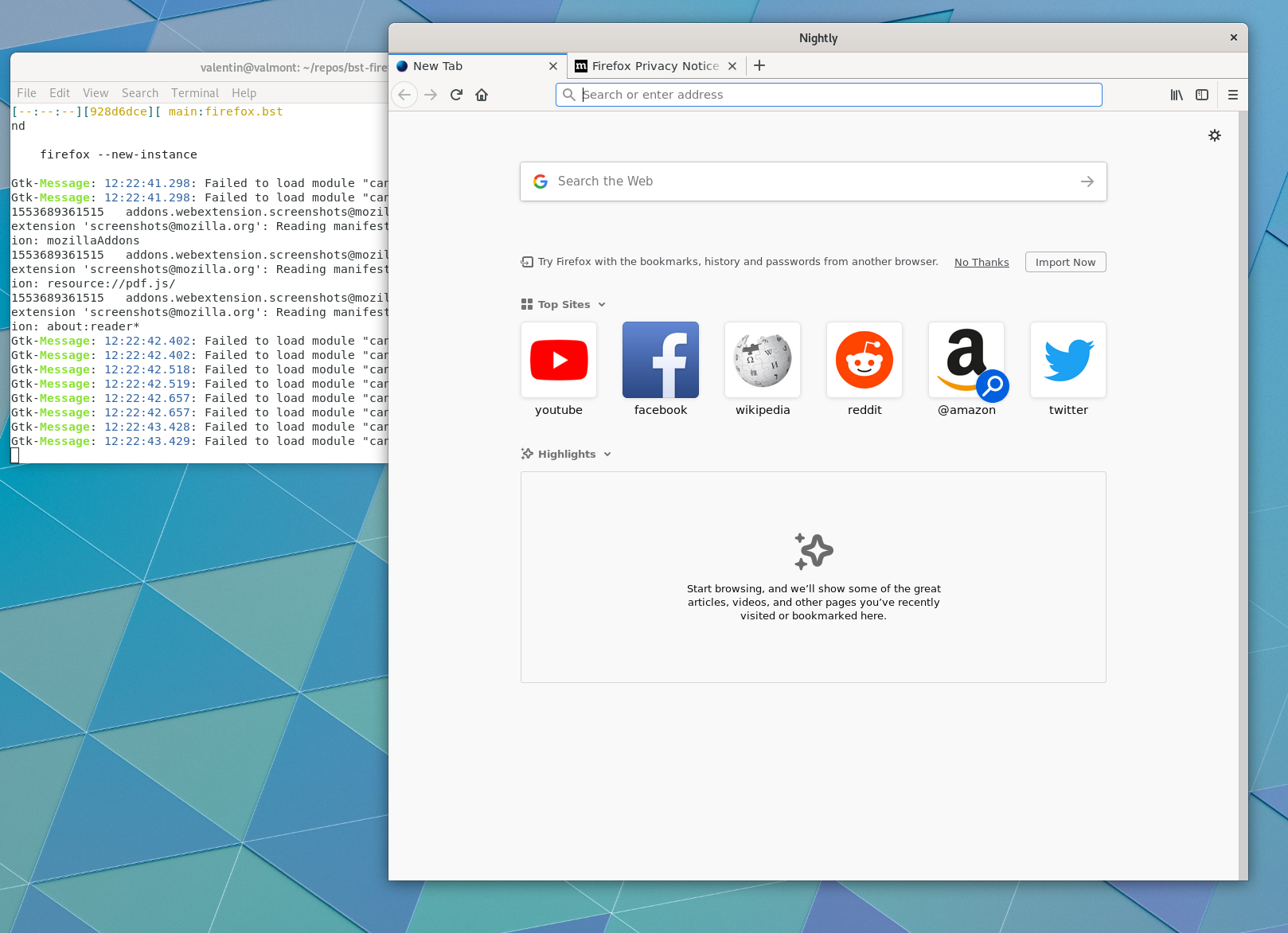
<p><img src="/bst_shell_firefox.png" alt="Firefox on &ldquo;bst shell&rdquo;"></p>
<p>In order to do some debugging, you can create a new element that depends on
<code>firefox.bst</code> as well as your required debugging tool from Freedestkop SDK,
for example <code>gdb.bst</code>. After building it, just <code>bst shell</code> that element.</p>
<pre tabindex="0"><code>kind: stack
depends:
- filename: base/gdb.bst
  junction: freedesktop.bst
- filename: firefox.bst
</code></pre><h4 id="building-the-snap-package">Building the snap package</h4>
<p>To build, install and run Snappy packages:</p>
<div class="highlight"><pre tabindex="0" class="chroma"><code class="language-sh" data-lang="sh"><span class="line"><span class="cl">bst build snap/image.bst
</span></span><span class="line"><span class="cl">bst checkout snap/image.bst snap/
</span></span><span class="line"><span class="cl">snap install --dangerous snap/firefox.snap
</span></span><span class="line"><span class="cl">/snap/bin/firefox --new-instance
</span></span></code></pre></div><p>Elements related to making a snap elements are in directory
<a href="https://gitlab.com/valentindavid/firefox-buildstream/tree/master/elements/snap"><code>elements/snap</code></a>.</p>
<p>Element
<a href="https://gitlab.com/valentindavid/firefox-buildstream/blob/master/elements/snap/firefox.bst"><code>snap/firefox.bst</code></a>
creates a directory ready for Snappy with the <code>meta/snap.yaml</code>
file. We do not provide a static file for <code>meta/snap.yaml</code> as we may
use BuildStream variables to be expanded.</p>
<p>Element
<a href="https://gitlab.com/valentindavid/firefox-buildstream/blob/master/elements/snap/image.bst"><code>snap/image.bst</code></a>
takes this directory and builds a proper <code>.snap</code> file using
<code>mksquashfs</code>.</p>
<h4 id="building-the-flatpak-package">Building the flatpak package</h4>
<p>To build, install and run Flatpak packages:</p>
<div class="highlight"><pre tabindex="0" class="chroma"><code class="language-sh" data-lang="sh"><span class="line"><span class="cl">bst build flatpak/repo.bst
</span></span><span class="line"><span class="cl">bst checkout flatpak/repo.bst repo/
</span></span><span class="line"><span class="cl">flatpak remote-add --no-gpg-verify local-firefox repo/
</span></span><span class="line"><span class="cl">flatpak install local-firefox org.mozilla.Firefox
</span></span></code></pre></div><p>It is possible to export a bundle. Please see the
<a href="http://docs.flatpak.org/en/latest/single-file-bundles.html">documentation</a>.</p>
<p>Elements related to building the Flatpak are in
<a href="https://gitlab.com/valentindavid/firefox-buildstream/tree/master/elements/flatpak"><code>elements/flatpak</code></a>.</p>
<p>The main element is
<a href="https://gitlab.com/valentindavid/firefox-buildstream/blob/master/elements/flatpak/org.mozilla.Firefox.bst"><code>flatpak/org.mozilla.Firefox.bst</code></a>
which builds the built directory for flatpak.</p>
<p>This element is then taken in
<a href="https://gitlab.com/valentindavid/firefox-buildstream/blob/master/elements/flatpak/repo.bst"><code>flatpak/repo.bst</code></a>
which creates a flatpak repository using <code>flatpak build-export</code> (It is
Flatpak, not FlatpakBuilder).</p>
<h3 id="application-path">Application path</h3>
<p>Flatpak applications expect to be mounted at <code>/app</code>. However, this is not
the case with Snappy where it is available at <code>$SNAP</code>. Flatpak runs
<code>ldconfig</code> on application with <code>/app/lib</code> activate. For Snappy, wrapper
scripts are used to set <code>LD_LIBRARY_PATH</code> to <code>$SNAP/lib</code>. For loading library
that works.</p>
<p>When it comes to other data to load however, the application needs to be
aware of the path. The wrapper may define more paths using environment
variables. But the application itself needs to be able to read them.
That might mean modifying it, and patching some dependencies.</p>
<h3 id="current-status">Current status</h3>
<p>At the time of writing the work is a <a href="https://gitlab.com/freedesktop-sdk/freedesktop-sdk/merge_requests/551">merge
request</a>
being reviewed on the Freedesktop SDK.</p>
<p>The CI is ready to publish the Freedesktop SDK runtime as soon as we have a new
release. There will also be edge builds automatically pushed at each
new merge. The name is reserved to be
<a href="freedesktop-sdk-runtime-18-08">https://snapcraft.io/freedesktop-sdk-runtime-18-08</a>.</p>
<p>Because the Freedesktop SDK runtime is of &ldquo;base&rdquo; type, it will require
manual review from Snapcraft. I am waiting for finished review from
Freedesktop SDK before requesting one on Snapcraft&rsquo;s store.</p>
<h3 id="challenges-and-work-ahead">Challenges and work ahead</h3>
<p>The image of Freedesktop SDK for Snappy is soon ready to publish. But
there is still work ahead. I will give here a list of things I have in
mind that need to be done.</p>
<h4 id="snap-confine-and-etc"><code>snap-confine</code> and <code>/etc</code></h4>
<p><code>snap-confine</code> mounts <code>/etc</code> from host. And it remounts few exceptions from
the runtime image. Flatpak does the opposite by it takes most of things from
<code>/etc</code> from the image but has few exceptions taken from host or generated.</p>
<p>Freedesktop SDK has been made for Flatpak and for example, font
configuration in <code>/etc/fonts</code> is expected to be from the image to match
the fonts we provide.</p>
<p>It would be possible to selectively tell packages to use <code>/etc</code> or
<code>/usr/etc</code> depending whether they want to read respectively host or
image configuration. But this will be some work. We will probably fix
it case by case when bugs are filed.</p>
<p>For the Firefox demo, we worked around the font issue by copying
<code>/etc/fonts</code> in the application image, and defined <code>FONTCONFIG_PATH</code>
in the wrapper script.</p>
<h4 id="forced-to-provide-dash">Forced to provide Dash</h4>
<p><code>snap-confine</code> uses <code>apparmor</code>. <code>snap-confine</code> will run <code>/bin/sh</code> and
expects it to be Dash. That forces use to provide Dash as <code>/bin/sh</code> on
the Snap version of the Freedesktop SDK.  We would like of course that
<code>snap-confine</code> lets us use what Bourne Shell we want.</p>
<h4 id="buildstream-boiler-plate">BuildStream boiler-plate</h4>
<p>Because BuildStream is very generic it can be relatively verbose.
However applications will have mostly the same configuration and
plugins.</p>
<p>We have added support for configuration import through external
projects for this purpose. So soon we should see application configuration
provided directly by the Freedesktop SDK.</p>
<h4 id="nvidia-proprietary-drivers">Nvidia proprietary drivers</h4>
<p>I have not dealt with Nvidia proprietary drivers yet. My understanding
is that <code>snap-confine</code> mounts them. Freedesktop SDK already dispatches
with libglvnd, the Vulkan loader, and OpenCL loader. Drivers in
flatpak are provided through extensions. So I am guessing it will need
some tweaks for the paths.</p>
<h4 id="kde-and-gnome-sdks-to-snappy">KDE and Gnome SDKs to Snappy</h4>
<p>The Gnome SDK is already using BuildStream, so once we have a relatively
stable Snap version of Freedesktop SDK, we will look at providing this
GNOME Build Meta.</p>
<p>KDE SDK is still built using FlatpakBuilder. So it would need to be
rewritten using BuildStream.</p>
<h3 id="aknowledgements">Aknowledgements</h3>
<p>This work has been sponsored by <a href="https://codethink.co.uk/">Codethink Ltd</a>.</p>
<div style="text-align: center">
  <a href="https://codethink.co.uk/">
     <img
       src="/codethink-logo.png"
       alt="Codethink Logo"
       />
  </a>
</div>

]]></content>
  </entry>
  <entry>
    <title type="html"><![CDATA[LAS]]></title>
    <link href="https://valentindavid.com/posts/2018-09-25-las-2018/"/>
    <id>https://valentindavid.com/posts/2018-09-25-las-2018/</id>
    <author>
      <name>Valentin David</name>
    </author>
    <published>2018-09-25T00:00:00+00:00</published>
    <updated>2018-09-25T00:00:00+00:00</updated>
    <content type="html"><![CDATA[<p>I recently went to <a href="https://las.gnome.org/conferences/LAS">Libre Application Summit (LAS)
2018</a> in Denver, CO.
I went there to present the release of Freedesktop SDK 18.08 along with
Tom Coldrick, Adam Jones.</p>
<p>There were plenty of interesting talks. I will not cover everything.
But I would like here to talk about what I took out of it.</p>
<p>One of the interesting part of the conference was the different talks
given from Aleix Pol and Albert Astals Cid from
<a href="https://www.kde.org/">KDE</a>.  We got an interesting overview of their
views, their process and what they provide to both users and
developers. It is important for the developer to reach the user and
address their needs and that promptly. The release process of KDE
applications is very intensive with a cycle of only four
months. Discover, their application installation interface, gives the
choice to the user what application backend to use: distribution
package, Flatpak or Snap. While they still prefer the distribution
packages, it seems it is something that might change.  The reason
mentioned was the issues due to PPAs.  This sounds like a good move.</p>
<p>This is in contrast with what <a href="https://elementary.io/">Elementary OS</a>
is doing.  Cassidy James Blaede and Daniel Foré presented their view
of a more homogeneous application ecosystem where technologies are
recommended to developers to provide a better experience for both the
developer and the user.  They are slightly more controversial and try
to rethink software development approaches open-source has been using
for a long time.  While I am not sure all will be popular in FOSS, I
am looking forward to the positive outcomes of this experiment. One
thing interesting from their side is the monetization of FOSS
applications, the way to remind users that &ldquo;free&rdquo; software means
freedom, but they should still pay (what they want) for software.</p>
<p>From <a href="https://endlessos.com/">Endless</a>, Matthew Leeds talked about
Flatpak application distribution through USB keys and local
network. This was interesting and technical. The architectural design
is well thought. The user experience shown during the demo at the end
seems very good.</p>
<p>Other interesting Flatpak technical talk was Alex Larrson&rsquo;s technical
walk-through of Flatpak. This was interesting and this is the kind of
talk I wished I had heard before submitting my first patch to Flatpak.
This was very simple and still covered a lot. I recommend watching the
<a href="https://twitter.com/LASGNOME/status/1037807095335272448">video</a>.</p>
<p>On the side of user perspective we had interesting feedback by Ryan
Gorley from <a href="https://freehive.com/">FreeHive</a> on the state of
free software for digital artists. It is interesting to have the
testimony of a professional on the use of raster/vector graphics
editors, 3D modelers, sound editors, etc. He also provided his view on
how to make FOSS more popular. Interestingly, several points were
quite ideological about FOSS, which I do not think most of users care
about. But in his view FOSS can make the user feel empowered.</p>
<p>Looking forward to LAS 2019.</p>
]]></content>
  </entry>
</feed>